You drop a 40-piece spring collection. Every SKU needs a white-background hero, 2-3 styled flat lays, and seasonal variants for your Shopify store, Amazon listings, Etsy shop, and Instagram grid. That's 200-300 images — and you need them before the sell-through window closes.
The traditional path: ship inventory to a photographer, wait for studio availability, coordinate styling, wait 2-3 weeks for retouched images, then repeat the entire process in 10 weeks when your summer collection drops. One fashion startup priced this out at $35,000-40,000 per collection. Most DTC brands do the math and settle for 1-2 images per product instead.
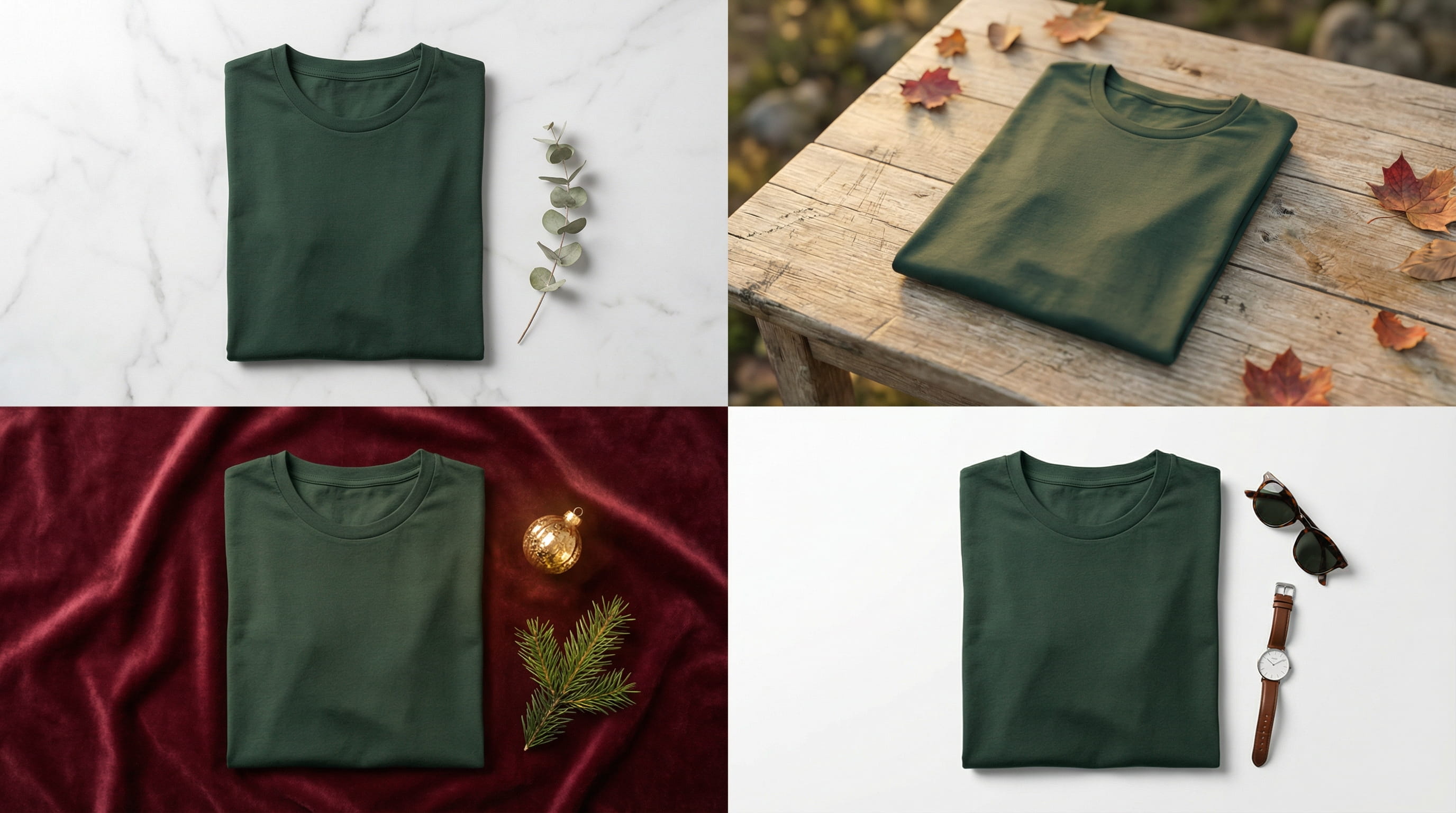
AI fashion photography breaks the cycle. Upload a flat lay photo, and AI generates it on a marble surface, linen texture, outdoor scene, or holiday backdrop — in seconds, not weeks. Same garment, every scene you need, from a single reference photo.
This guide covers how it works, what it costs, which garment types get the best results, and how to start generating lookbook-quality images today.
This article is for DTC fashion brands, Shopify apparel sellers, Etsy clothing shops, and small fashion labels who need collection-ready imagery without the traditional production timeline or budget.
In this guide:
- What is AI fashion photography?
- Why fashion photography is harder than other categories
- Real cost comparison
- What types of fashion images AI handles best
- How to get the best results
- Getting started with Loomenia
- FAQ
Key Takeaways:
- AI fashion photography generates styled product images from a single flat lay or product-on-white photo — no studio, models, or props
- Cost: under $1 per AI image vs. $50-500 per traditionally shot and retouched fashion photo
- The AI-generated fashion photography market hit $2.01 billion in 2025 and is projected to reach $6.12 billion by 2029
- Best for: flat lays, styled product shots, seasonal campaigns, and catalog imagery at scale
- Products with clear silhouettes (t-shirts, dresses, bags, shoes, accessories) produce the strongest results
- Tools like Loomenia generate publish-ready fashion images in under 60 seconds with no prompt writing
What Is AI Fashion Photography?
AI fashion photography uses generative AI to create professional product images of clothing and accessories from a single reference photo. Instead of booking a studio, hiring a photographer, and styling physical sets, you upload your product image and the AI places it in any scene you choose — a marble flat lay, a textured fabric surface, an outdoor setting, or an editorial composition.
This isn't the same as AI virtual try-on (which puts clothing on AI-generated models). AI fashion photography focuses on product-centric images — the garment, the bag, the shoe, the accessory — styled in scenes that look like they came from a professional lookbook shoot.
The technology has matured fast. The AI-generated fashion photography market reached $2.01 billion in 2025 (CAGR of 32.5%) and is projected to hit $6.12 billion by 2029. The BoF-McKinsey State of Fashion survey found that 73% of fashion executives said generative AI would be an important priority for their businesses — and adoption rates for AI-generated product visuals are growing 140% year-over-year among fast-fashion brands.
Why Fashion Photography Is Harder Than Other Product Categories
Fashion brands don't just need product photos. They need a system that keeps up with their release cadence — and every part of the traditional workflow fights against that.
The seasonal treadmill. Most apparel brands run 2-4 collection drops per year, each with 30-100 SKUs. That's 4-8 images per product, 2-4 times a year. Canon's analysis of fashion photography challenges identifies this volume as the single greatest pain point — brands now need 10x more images than a decade ago, across e-commerce, social media, PR, and marketing channels. By the time you finish shooting spring, summer samples are arriving.
The logistics chain. Traditional fashion photography means shipping inventory to a photographer (or flying product to a studio), coordinating with stylists, booking model time if you need on-figure shots, then waiting 1-3 weeks for retouched selects. For a small brand doing this 3x/year, that's 6-9 weeks of the year just waiting for images.
The consistency problem. A 50-piece collection needs to look like it belongs together — same lighting feel, same surface aesthetic, same brand mood. With traditional photography, a different studio setup between Tuesday and Thursday can break visual cohesion. A different photographer next season compounds it further.
The multi-platform tax. One SKU now needs different imagery for different channels: white background for Amazon, styled flat lay for Shopify, lifestyle context for Etsy, UGC-style for TikTok, editorial for Instagram. That's 5 distinct image styles per product. Traditionally, each style is a separate setup — or a separate shoot.
AI solves all four problems simultaneously:
- Speed: A flat lay photo becomes a styled scene in 15-60 seconds. A 50-product collection gets complete imagery in an afternoon, not 2-3 weeks
- Cost: Entrepreneur reports up to 80% cost reduction — one fashion startup cut per-collection costs from $35,000-40,000 to under $500
- Collection consistency: Every product goes through the same scene templates, so a 50-piece drop looks cohesive automatically — same marble surface, same lighting direction, same brand mood
- Platform variants in one session: Generate a white-background hero, a styled flat lay, a lifestyle scene, and a seasonal variant from the same reference photo. Five platforms, one upload
Pro Tip: The biggest conversion lift in fashion e-commerce comes from showing the same product in multiple contexts. AI makes this economically viable for every SKU in your collection, not just your best sellers.
AI Fashion Photography vs. Traditional: Real Costs
Here's what each approach costs for a 50-SKU seasonal collection needing 4 images per product (200 images total):
| Factor | Traditional Photography | AI Fashion Photography |
|---|---|---|
| Cost per image | $50-500+ (freelance to studio, retouched) | Under $1 |
| 200 images (50 products × 4) | $10,000-33,000+ | $100-600 |
| Turnaround | 2-3 weeks | Same day |
| Seasonal refresh | Full reshoot | New scene, same photos |
| A/B test variants | $50-500 per variant | Under $1 per variant |
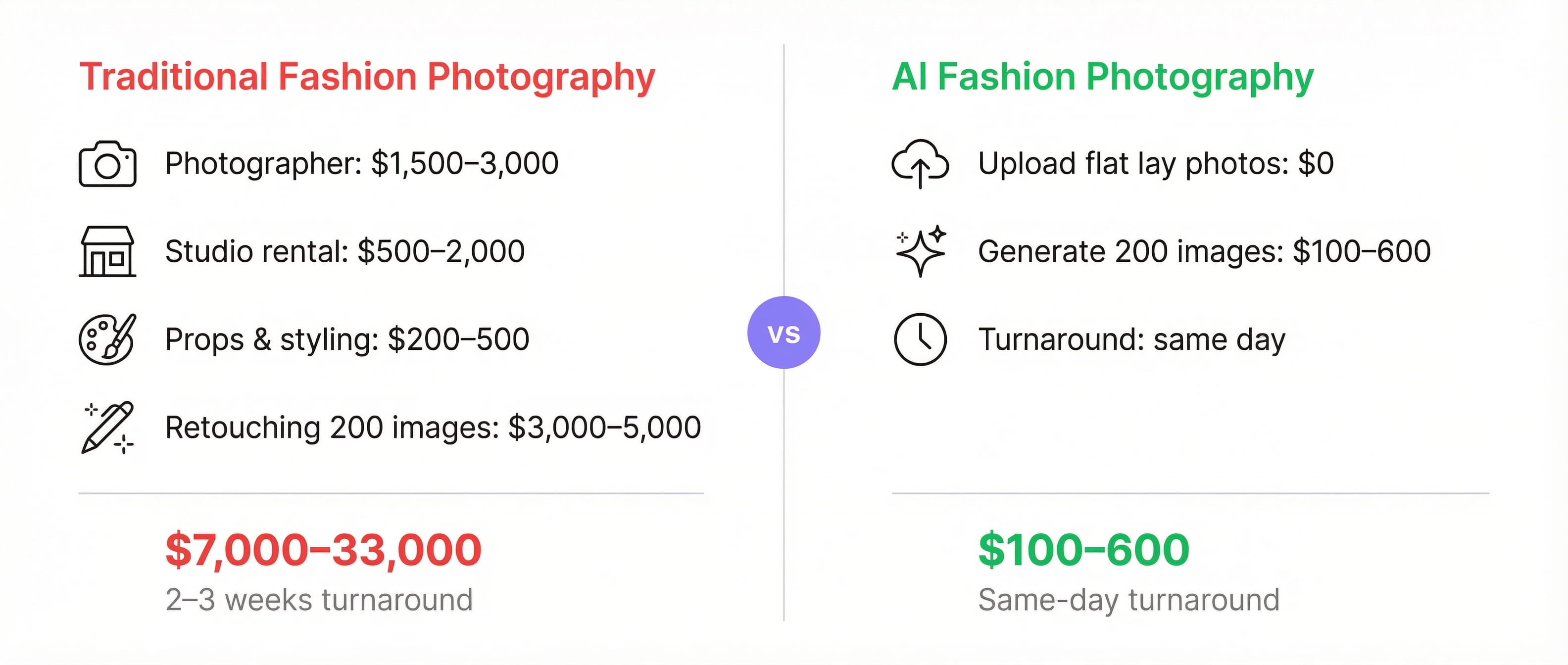
For a detailed breakdown of where traditional photography money goes (photographer day rates, studio rental, retouching costs), see our e-commerce product photos guide. The short version: a typical 200-image shoot runs $5,200-10,500 before adding models, hair, and makeup — which add another $2,000-5,000 per day.
According to PYMNTS, AI platforms now produce fashion product images for $0.75-1.30 each — images that can be reused across multiple campaigns, replacing shoots that previously cost thousands.
What this looks like in practice
Take a basic cotton t-shirt. You lay it flat on a white surface, snap a photo with your phone. That single reference image becomes:
- White-background catalog shot — clean, centered, ready for Amazon's main image slot
- Marble flat lay — the same tee on polished white marble with a sprig of eucalyptus, soft directional light. Shopify hero material
- Linen lifestyle — folded on natural linen fabric with sunglasses beside it. Etsy listing vibes
- Holiday seasonal — laid on burgundy velvet with a gold ornament nearby. November campaign, ready in March
- Editorial studio — minimal high-key composition with accessories. Instagram grid-worthy
Total time: under 5 minutes. Total cost: a few credits. Traditional equivalent: one garment across five setups, five surface changes, five rounds of styling, one invoice.
Traditional photography still wins for luxury editorial campaigns and high-fashion brand storytelling. For catalog imagery, marketplace listings, and seasonal campaigns — which represent 90%+ of most brands' image needs — AI delivers comparable quality at a fraction of the cost. For a deeper look at the broader shift, see our guide on virtual product photography.
What Types of Fashion Images AI Handles Best
Not all fashion product images are equal in AI difficulty. Here's what works and where you'll need extra care.
Works excellently
- Flat lays: T-shirts, dresses, pants, jackets laid flat and styled in scenes — marble surfaces, linen textures, wooden tables. This is AI's strongest fashion use case
- Accessories on surfaces: Bags, wallets, belts, hats, scarves placed on styled backgrounds
- Shoes: Sneakers, boots, heels — particularly strong with solid-color or matte materials
- Jewelry on display: Necklaces, earrings, bracelets on fabric, stone, or branded surfaces (not on skin — see below)
- Packaging and tags: Brand boxes, tissue wrapping, shopping bags — anything product-adjacent
Works well with care
- Draped or hanging garments: AI can generate garments hanging on racks or draped over furniture, though fabric draping physics occasionally need a regeneration or two
- Textured fabrics: Knits, wool, denim — the texture is usually preserved well, but high-detail weave patterns may simplify slightly
- Shiny materials: Satin, silk, patent leather — reflective surfaces take 2-3 generations to get right, similar to jewelry and glass in product photography
Still better with traditional photography
- On-model shots with natural poses: AI virtual try-on is improving rapidly, but brands requiring authentic human body interaction with fabric (drape, stretch, movement) still get the most realistic results from real models. This is a separate category from product photography — and AI tools focused on on-model generation (Uwear, Botika) are closing the gap fast
- Detail close-ups of stitching and hardware: Extreme close-ups of zipper pulls, button details, or stitch patterns work better from a real macro photo
Pro Tip: The most effective fashion image strategy in 2026 combines both: shoot your hero on-model images traditionally (or use AI virtual try-on tools), then use AI product photography for the flat lay, lifestyle, and seasonal variations that fill out your gallery. This gives you the authentic hero shot customers expect plus the volume of styled imagery that drives conversion.
How to Get the Best Results from AI Fashion Photography
1. Start with a clean flat lay
Lay your garment flat on a white or light gray surface. Smooth out wrinkles — this is the single biggest quality factor. Use natural daylight or two LED panels. Your phone camera is fine. The AI doesn't need a perfect photo; it needs a clean, well-lit one where the product is clearly visible and fills most of the frame.
2. Shoot multiple product types consistently
Use the same setup for every garment in your collection. Same background, same lighting direction, same distance. Consistency in your reference photos produces consistency in your AI outputs — which means a cohesive lookbook, not a mismatched catalog.
3. Use scene styles that match your brand
If your brand is minimal Scandinavian, generate marble and linen surfaces with soft neutral tones. If you're a bold streetwear label, go for concrete, metal, and high-contrast lighting. The scene communicates brand identity as much as the product itself.
4. Generate multiple variations
AI generation is probabilistic. Generate 4-6 variations per scene and pick the strongest. At under $1 per image, testing is essentially free. For your hero images, spend the extra 60 seconds generating options.
5. Match platform requirements
| Platform | What performs best for fashion |
|---|---|
| Shopify | White background hero + 3-4 lifestyle flat lays. Consistent aspect ratios |
| Amazon | White background required for main image. Lifestyle and flat lay for gallery |
| Etsy | Lifestyle context outperforms plain white. Styled flat lays with props |
| TikTok Shop | UGC-style images. Casual, relatable settings over polished studio looks |
| Instagram Shopping | Editorial and lifestyle. Aspirational scenes that fit your grid aesthetic |
Create Fashion Product Photos with Loomenia
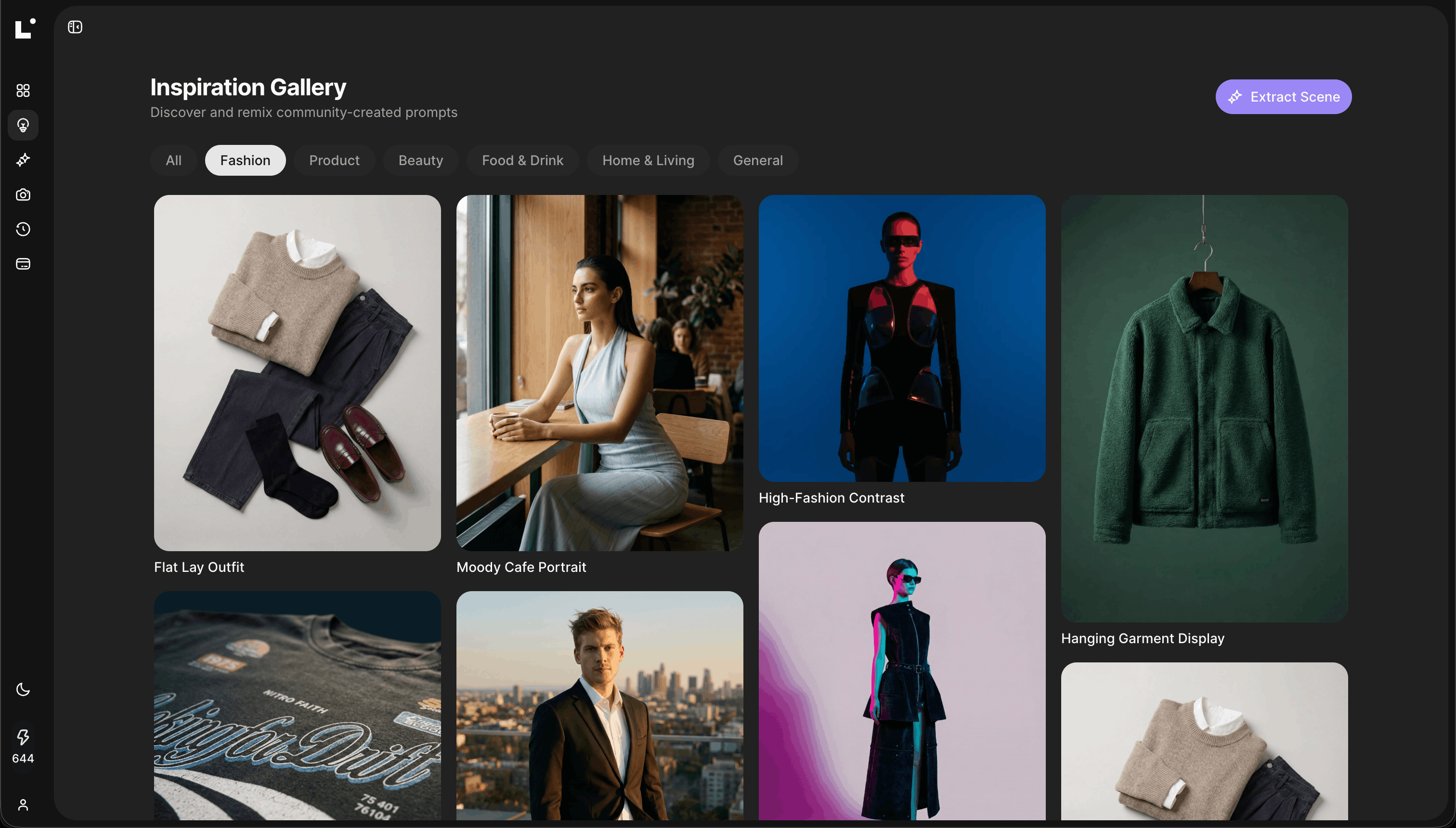
Loomenia AI Image Studio is built for product photography — including fashion flat lays, accessory shots, and styled catalog imagery. The key difference from other AI tools: you never write a prompt. You select from visual options, and the system builds the prompt for you.
How it works for fashion product photos:
- Upload your garment as a reference image — a flat lay on white, a product on a hanger, or a clean product-on-white shot
- Pick a template from the gallery (Marble Flat Lay, Linen Texture, Natural Window Light, Editorial Studio, Seasonal Holiday, etc.) — or configure your own scene using dropdowns for environment, lighting, camera angle, and style
- Auto color matching — upload your product and Loomenia extracts the dominant colors from the image, offering them as clickable swatches. Your scene's accent colors automatically match your garment's palette
- Generate — images render in 15-45 seconds at up to 4K resolution
- Refine with chat — tell the AI "warm up the background" or "make the surface more textured" without regenerating from scratch
For full lookbooks, use the AI Photoshoot feature: upload 1-3 reference photos of your product, and the system's AI agents analyze the subject, then direct 3, 5, or 10 varied shots — different angles, compositions, and scene styles — while keeping your product consistent across every image.
Love a competitor's product styling? Use Extract Scene — upload the image and Loomenia reverse-engineers the lighting, camera settings, and environment into a reusable configuration. Apply it across your entire collection.
| Plan | Price | Credits/month | ~Pro Images (2K) | ~Pro Images (4K) |
|---|---|---|---|---|
| Plus | $29/mo | 400 | ~100 | ~57 |
| Pro | $79/mo | 1,500 | ~375 | ~214 |
At $29/month, that's enough for a complete 4-image gallery for 25 products — one seasonal collection handled for less than the cost of a single hour of studio rental.
Try Loomenia free — no credit card required →
Frequently Asked Questions
How is AI fashion photography different from AI virtual try-on?
AI fashion photography generates product-centric images — your garment styled on surfaces, in scenes, and in compositions without a human model. Virtual try-on puts clothing onto AI-generated or real model photos. They solve different problems: fashion photography fills your catalog and marketplace listings, while virtual try-on helps customers visualize fit. Many brands use both — AI fashion photography for their product gallery, and virtual try-on for the interactive shopping experience.
Can I use AI-generated fashion photos on Amazon and Shopify?
Yes, with one caveat. Amazon requires the main product image to be a real photograph on a white background — AI-generated lifestyle and flat lay images work perfectly for gallery slots (images 2-7). Shopify and Etsy accept AI-generated images without restrictions. If you sell to EU customers, note that the EU AI Act requires disclosure of AI-generated content, with fines up to €15 million for non-compliance.
What fashion products work best with AI photography?
Products with clear silhouettes and non-reflective materials produce the best results: t-shirts, dresses, pants, jackets, bags, shoes, hats, scarves, and most accessories. Textured fabrics like knit, denim, and cotton photograph well. Shiny materials (satin, patent leather) may need 2-3 extra generations. On-model shots are a separate category best handled by specialized virtual try-on tools or traditional photography.
How much does AI fashion photography cost compared to traditional?
Traditional fashion photography costs $50-500+ per retouched image depending on whether you use a freelancer or studio. AI fashion photography costs under $1 per image. For a 50-SKU collection needing 200 images, that's $10,000-33,000+ traditional vs. $100-600 with AI. Entrepreneur reports up to 80% cost reduction for small businesses. Most AI tools run $29-79/month with credits for hundreds of images.
Will AI fashion photos look fake?
In 2024, often yes. In 2026, the gap has closed dramatically. For flat lays and product-on-surface shots, most customers cannot distinguish AI-generated images from traditional photography. The biggest quality factor isn't the AI — it's your reference photo. A clean, wrinkle-free, evenly-lit flat lay gives the AI everything it needs for photorealistic results. The AI-generated fashion photography market is growing at 32.5% annually for a reason — the output quality has crossed the threshold where most customers can't tell the difference.
How fast can I generate a full product gallery?
A single image generates in 15-60 seconds. A complete 4-image gallery (white background, flat lay, lifestyle, seasonal) takes under 5 minutes per product. With batch generation tools like Loomenia's AI Photoshoot, you can generate 3-10 varied shots from a single reference photo in one session. A 50-product collection can have complete imagery in an afternoon.
The Bottom Line
Fashion brands need more images than ever — for marketplaces, social media, seasonal campaigns, and A/B testing. Traditional photography simply can't scale to meet that demand without breaking the budget.
AI fashion photography isn't a compromise. It's a multiplier. One flat lay photo becomes a complete lookbook of styled scenes — marble surfaces, outdoor settings, seasonal themes, editorial compositions — in minutes instead of weeks, at $29/month instead of $5,000 per shoot.
The brands that will win in 2026 aren't the ones with the biggest photography budgets. They're the ones publishing the most varied, platform-optimized, seasonally-fresh product imagery. And AI makes that possible for a solo Etsy seller and a 500-SKU DTC brand alike.
Start creating fashion product photos with Loomenia →
Sources:
- GlobeNewsWire: AI-Generated Fashion Photography Market Trends — Market growing from $2.01B (2025) to $6.12B (2029) at 32.5% CAGR
- Entrepreneur: Smart Entrepreneurs Cutting Product Photography Costs by 80% — Fashion startup case study: $35K-$40K reduced to under $500
- PYMNTS: AI-Generated Fashion Shoots Offer Cost Savings — AI platforms producing fashion images at $0.75-$1.30 each
- Photta: Product Photography Pricing Comparison — Traditional studio ($150-$500+/image), freelance ($50-$150/image), AI (under $1/image)
- BoF-McKinsey: State of Fashion — Generative AI — 73% of fashion executives say gen AI is an important business priority
- WearView: 12 Best AI Tools for Fashion Brands in 2026 — 140% YoY growth in AI-generated visual adoption among fast-fashion brands
- Canon: 5 Challenges in Fashion Product Photography — Volume of digital assets as top fashion photography challenge
- EU AI Act Article 50: Transparency Obligations — AI-generated content disclosure requirements