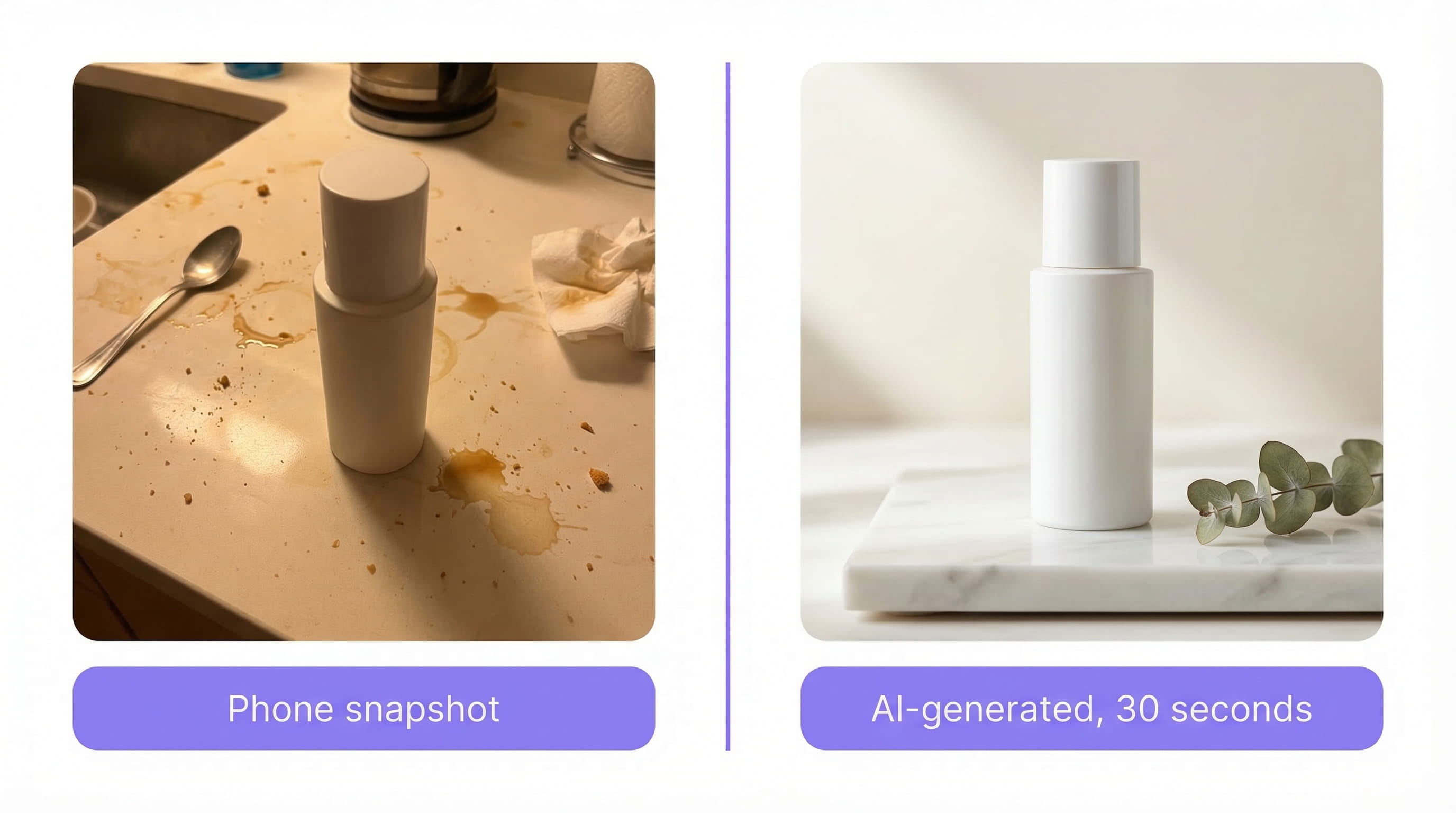
You need product photos. Good ones. The kind that make people stop scrolling and click "Add to Cart."
But hiring a photographer costs $200-500 per product. Renting a studio adds another $100-300/hour. And if you're launching 20+ SKUs this quarter, the math gets painful fast.
Virtual product photography solves this. It uses AI to generate professional product images from a single reference photo — no physical studio, no photographer, no props. This guide covers how it works, what it costs, when it makes sense, and how to get started today.
This article is for e-commerce sellers, DTC brand owners, and small businesses who need professional product photos without the traditional production budget.
In this guide:
- What is virtual product photography?
- How it works (4 steps)
- Real cost comparison
- Best use cases
- How to get the best results
- Getting started with Loomenia
- FAQ
Key Takeaways:
- Virtual product photography generates studio-quality images from one reference photo using AI
- Cost: $0.10-2.00 per image vs. $25-150+ per image with traditional photography
- Best for: product listings, A/B testing hero images, seasonal campaigns, and rapid SKU launches
- Edge cases: jewelry close-ups with environmental reflections and glass with liquid refraction may need a few extra generations
- Tools like Loomenia AI Image Studio can produce publish-ready images in under 60 seconds
What Is Virtual Product Photography?
Virtual product photography is the process of creating product images using AI instead of a physical camera and studio setup. You upload a reference photo of your product, describe the scene you want — or simply select from visual presets — and the AI generates a professional image.
Unlike traditional 3D rendering — which requires CAD models, texture mapping, and technical expertise — modern AI virtual photography works from flat 2D photos. No 3D files needed. No modeling skills required. You can create product photos with AI using nothing more than a phone snapshot.
The technology has matured rapidly. In 2024, AI-generated product images were noticeably artificial. By 2026, AI image generation tools produce images that most customers cannot distinguish from traditional photography. A BigCommerce study of 12,000 online stores found that merchants using AI-enhanced product photography saw conversion rate improvements of 35-60%. The global AI image generator market, valued at $9.1 billion in 2024, is on track to exceed $30 billion by the end of 2026.
How Virtual Product Photography Works
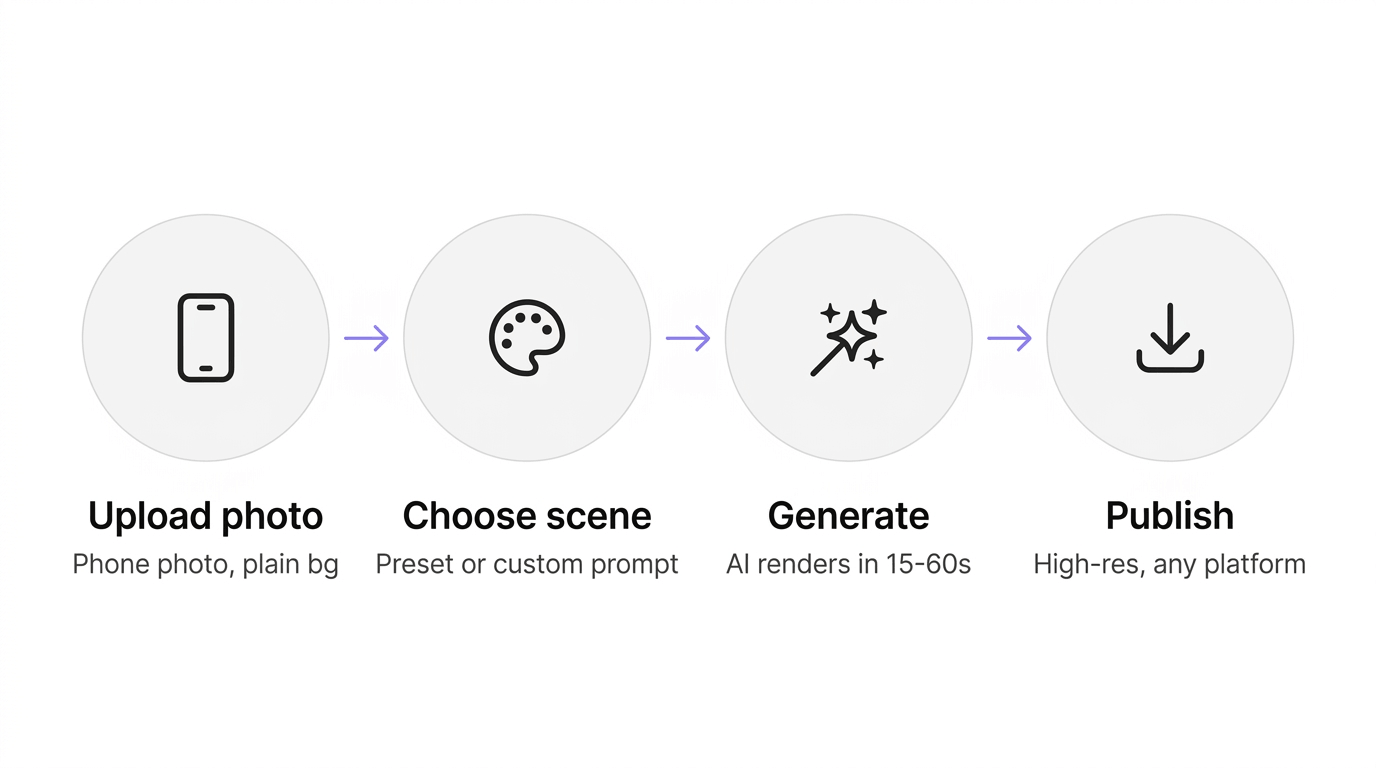
The process is straightforward:
Step 1: Upload your product photo. A clean shot on a white or plain background works best. Phone photos work — you don't need a DSLR. This becomes your reference image that the AI uses to understand your product.
Step 2: Choose or describe your scene. Select a visual preset (lifestyle flat lay, marble surface, outdoor setting), browse a template gallery, or write a custom prompt like "product on a wooden table, soft morning light, minimal Scandinavian kitchen background." Some tools like Loomenia let you configure lighting, camera angle, and style through visual selectors — no prompt writing required.
Step 3: Generate. The AI creates a new image of your product in the scene you described, matching lighting and shadows to make the composition look natural. This takes 15-60 seconds depending on the tool and resolution.
Step 4: Download and publish. Output ranges from 1K to 4K resolution — ready for Shopify, Amazon, Etsy, or social media.
Pro Tip: Start with 3-4 different scenes for the same product. Use the best-performing image as your hero, and the rest for your product gallery. A BigCommerce study of 12,000 stores found that AI-enhanced product photography improved conversion rates by 35-60%, with fashion and lifestyle products seeing the highest gains.
Virtual Photography vs. Traditional Photography: Real Costs
Here's what each approach actually costs for a typical 50-SKU product line:
| Factor | Traditional Studio | Virtual (AI) Photography |
|---|---|---|
| Cost per image | $25-150+ | $0.10-2.00 |
| 50 products, 4 images each | $5,000-30,000 | $20-400 |
| Turnaround time | 1-3 weeks | Same day |
| Reshoots/iterations | $50-100+ per reshoot | Regenerate instantly |
| Seasonal updates | Full reshoot required | New prompt, same photo |
| Equipment needed | Camera, lights, studio, props | Phone + AI tool |
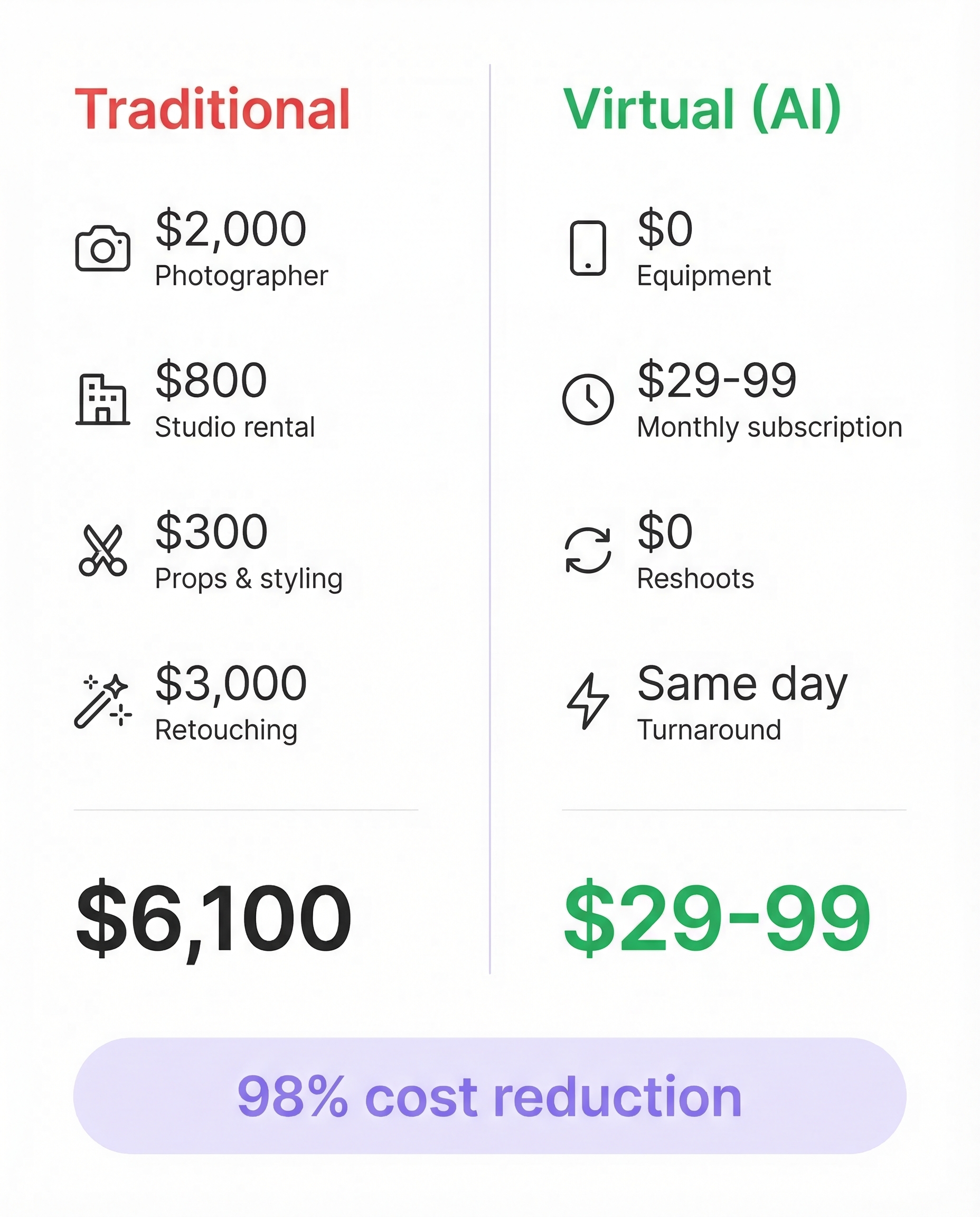
Where the money actually goes (traditional)
For a 50-SKU product line needing 4 images each:
| Line item | Cost |
|---|---|
| Photographer day rate (2 days) | $2,000 |
| Studio rental (2 days) | $800 |
| Props and styling | $300 |
| Retouching (200 images x $15) | $3,000 |
| Total | $6,100 |
With virtual product photography, the same 200 images cost $29-79/month — a 98%+ reduction in AI product photography cost. According to Entrepreneur, small businesses using AI product photography in 2025-2026 have reduced production costs by up to 80%.
Traditional photography still wins for luxury editorial campaigns where every shadow is hand-crafted. For everything else — Shopify listings, Amazon secondary images, Etsy shops, social media content — virtual product photography delivers comparable quality at a fraction of the cost. If you need ecommerce product photos at scale, AI is now the default choice.
When Virtual Product Photography Makes Sense
Best use cases
- Rapid SKU launches: You're adding 10-50 products this month and need images fast
- A/B testing backgrounds: Test lifestyle vs. white background vs. seasonal themes without reshooting
- Seasonal campaigns: Switch from summer to holiday backgrounds in minutes, not weeks
- Marketplace listings: Shopify, Etsy, TikTok Shop, and Amazon secondary/lifestyle images — where volume matters more than editorial perfection
- Social media content: Instagram, Pinterest, and ads that need fresh visuals weekly
- Pre-production mockups: Visualize products before manufacturing to validate concepts
When to stick with traditional
- Jewelry close-ups: Gold and silver reflect their environment — a ring shot on a white table will show white table reflections when placed on AI-generated skin. Needs extra generations to get right
- Glass with liquid refraction: Clear bottles with colored liquids still challenge AI's understanding of how light bends through glass. Usually solvable with 2-3 regenerations
- Lifestyle with real models: AI model generation has improved dramatically, but brands relying on authentic human interaction shots still get better results from real photography
- Regulated industries: Medical devices and food packaging may have strict rules about image authenticity that require real photography
How to Get the Best Results
Not all AI-generated product photos are equal. The quality of your output depends on your input and process.
1. Start with a clean reference photo
Shoot your product on a white or light gray background. Even lighting, no harsh shadows. A phone camera in natural daylight works. The cleaner the input, the better the AI can understand and relight your product.
2. Be specific with your scene descriptions
Bad prompt: "nice background"
Good prompt: "product centered on a pale oak table, soft diffused window light from the left, blurred green plant in background, clean minimal aesthetic"
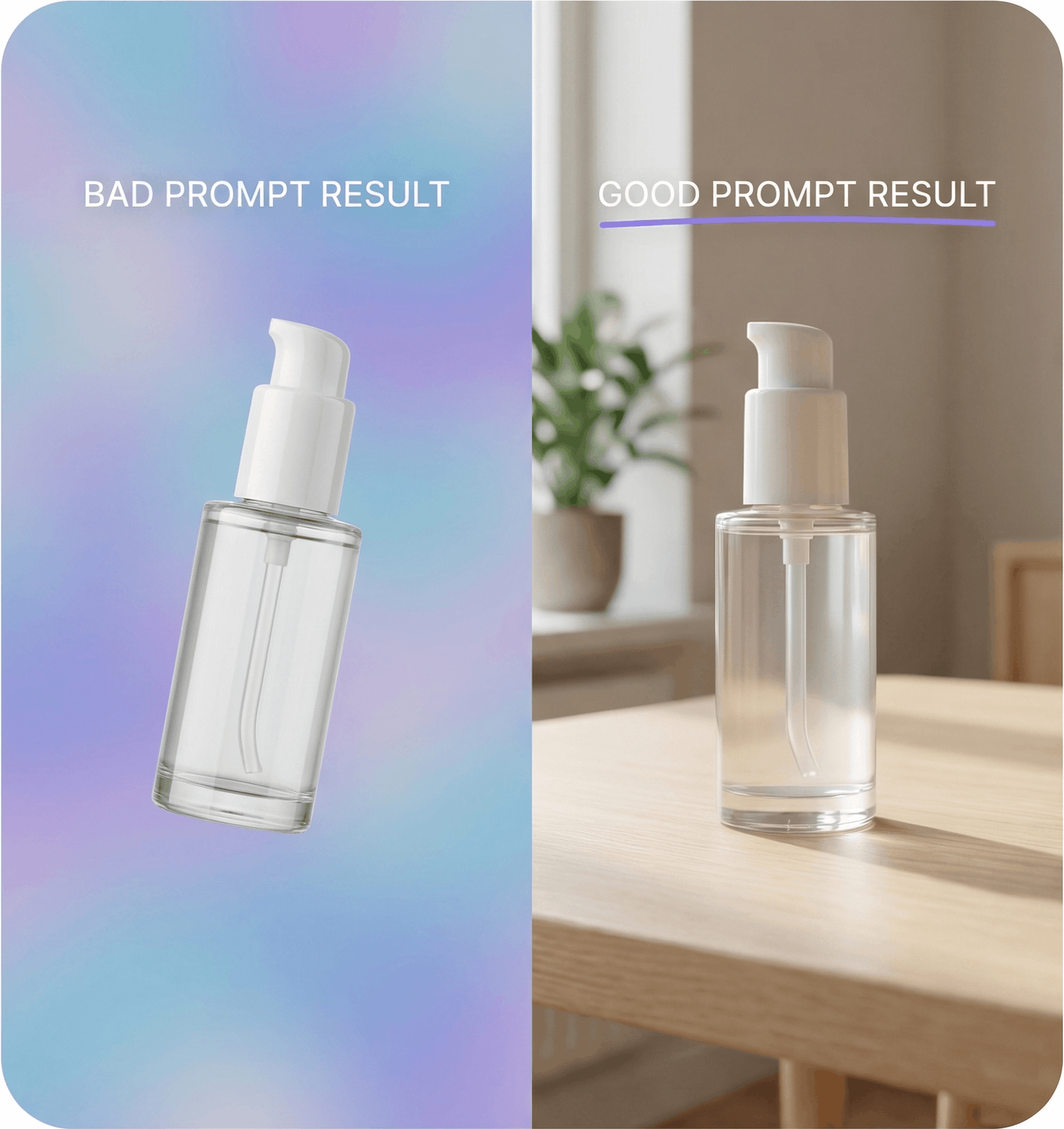
The more specific you are about surface, lighting direction, color palette, and mood, the more professional your output. Or skip prompts entirely — tools with visual selectors let you configure these settings through dropdowns instead of writing descriptions.
3. Generate multiple variations
Don't settle for the first result. Generate 4-8 variations and pick the strongest. AI generation is probabilistic — some outputs will be better than others. At $0.10-2.00 per image, experimentation is essentially free.
4. Match your brand
Use consistent scene types across your product line. If your brand is minimal and Scandinavian, don't mix in tropical backgrounds. Consistency builds trust.
Getting Started with Loomenia
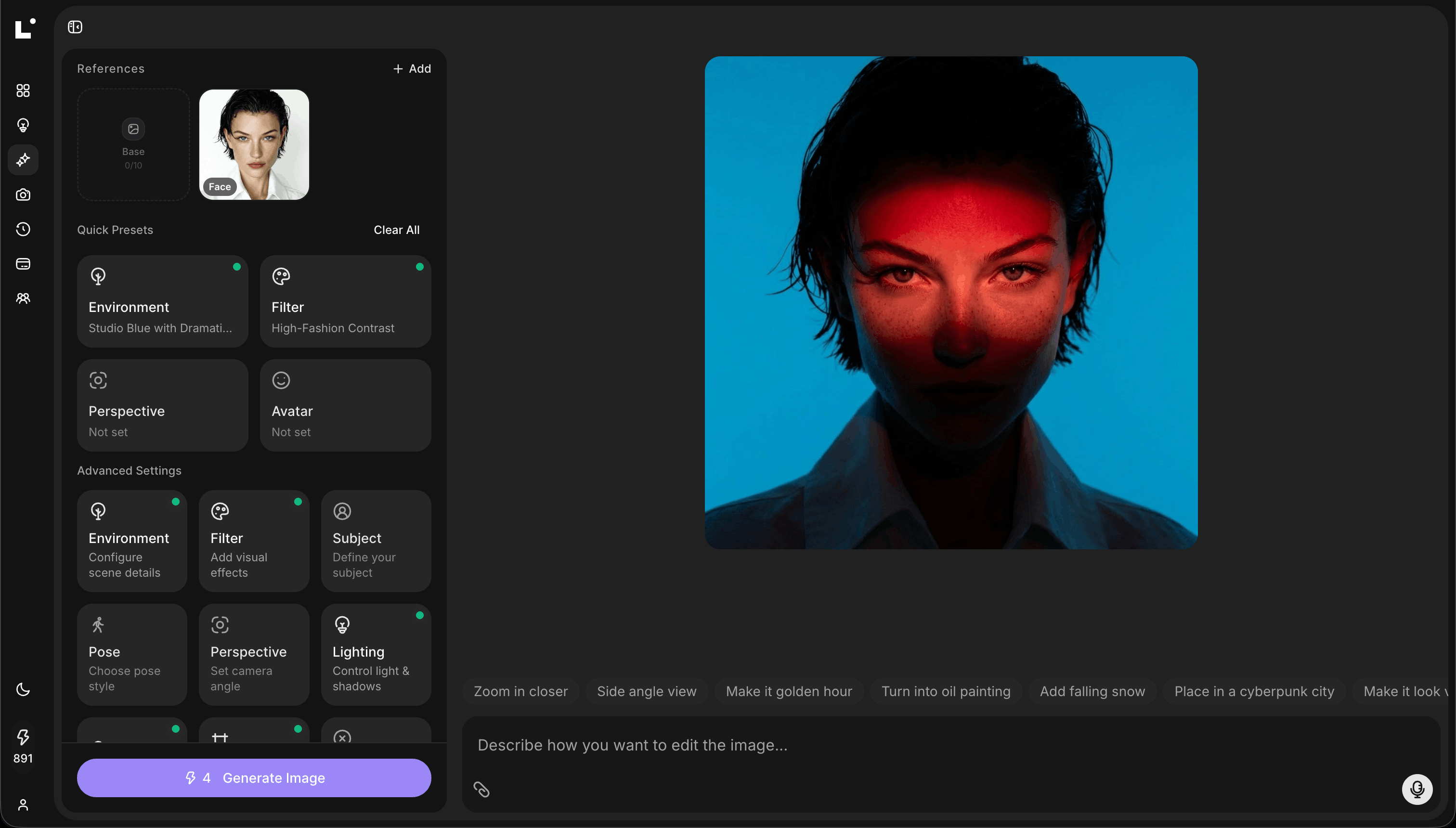
Loomenia AI Image Studio is an AI image generation platform with a no-prompt interface — you don't need to learn prompt engineering to create professional product photos. Here's how to go from zero to published in under 5 minutes:
- Upload a product photo as a reference image (phone quality is fine)
- Configure your scene — pick from visual presets for environment, lighting, and camera angle, or browse the template gallery for ready-made product photography setups
- Generate — images render in 15-45 seconds at up to 4K resolution
- Refine — use chat-based editing to tweak the result ("make the background warmer," "add a shadow on the left") without regenerating from scratch
- Download in high resolution, ready for any platform
What makes Loomenia different from other AI product photography tools: instead of writing complex prompts, you select from curated visual options — lighting style, camera angle, environment, color grading — and the system builds the prompt for you. For product launches that need multiple angles, the AI Photoshoot feature generates 3-10 varied shots from a single reference image automatically.
Plans start at $29/month with credits for hundreds of images. No credit card required to try.
Frequently Asked Questions
Is virtual product photography legal for e-commerce listings?
It depends on the platform and image slot. Amazon's main product image must be a real photograph of the actual product — fully AI-generated hero images are not allowed. However, AI-enhanced images and AI-generated lifestyle/secondary images are widely used. Shopify, Etsy, and most other platforms accept AI-generated images without restrictions. One caveat: starting August 2026, the EU AI Act requires disclosure of AI-generated content for products targeting EU customers, with fines up to 15 million euros for non-compliance.
Can I use a phone photo as the reference image?
Absolutely. Modern AI tools are designed to work with phone photos. Shoot on a clean background with even lighting. Natural daylight near a window works best. You don't need a professional camera.
How many images can I generate per product?
With most AI tools, there's no practical limit. Loomenia's plans include batch generation so you can create dozens of variations per product. This is ideal for A/B testing which backgrounds and scenes convert best on your listings.
Will AI product photos look fake?
In 2024, yes — you could often tell. In 2026, the gap has closed significantly. Most customers cannot tell the difference between AI-generated and traditional product photography. By the end of 2026, an estimated 40% of all e-commerce apparel listings will feature AI-generated images. The biggest tell is usually lighting inconsistency, which you can avoid by using a clean, evenly-lit reference photo.
What product types work best with virtual photography?
Products with matte or semi-matte surfaces work best: skincare, cosmetics, food packaging, candles, apparel (flat lay), electronics, home goods, and accessories. Products with complex reflections (glass bottles, polished metal) require more care but are increasingly well-handled by newer AI models.
The Bottom Line
Virtual product photography isn't coming — it's here. For e-commerce sellers who need professional images without professional budgets, AI tools have eliminated the biggest barrier to great product visuals.
The math is simple: one traditional photoshoot costs more than a full year of AI-generated images. And when you can test 10 backgrounds in the time it takes to set up one studio shot, your listing optimization compounds fast.
Start generating product photos with Loomenia →
Sources:
- BigCommerce / Breaking AC: AI Product Photos Revolutionizing E-Commerce — 35-60% conversion rate improvement across 12,000 stores
- Photoroom: 50 AI Product Photography Statistics for 2026 — 40% of e-commerce apparel listings will feature AI-generated images by end of 2026
- North Penn Now: AI Product Photography Redefining Visual Marketing — Market growth from $9.1B to $30B
- Entrepreneur: Cutting Product Photography Costs by 80% With AI — Small business cost reduction data
- Amazon Image Optimization Guide 2026 — Amazon main image requirements
- EU AI Act and Shopify Merchants — August 2026 disclosure requirements
- Shopify: Product Photography Guide — Traditional photography cost benchmarks