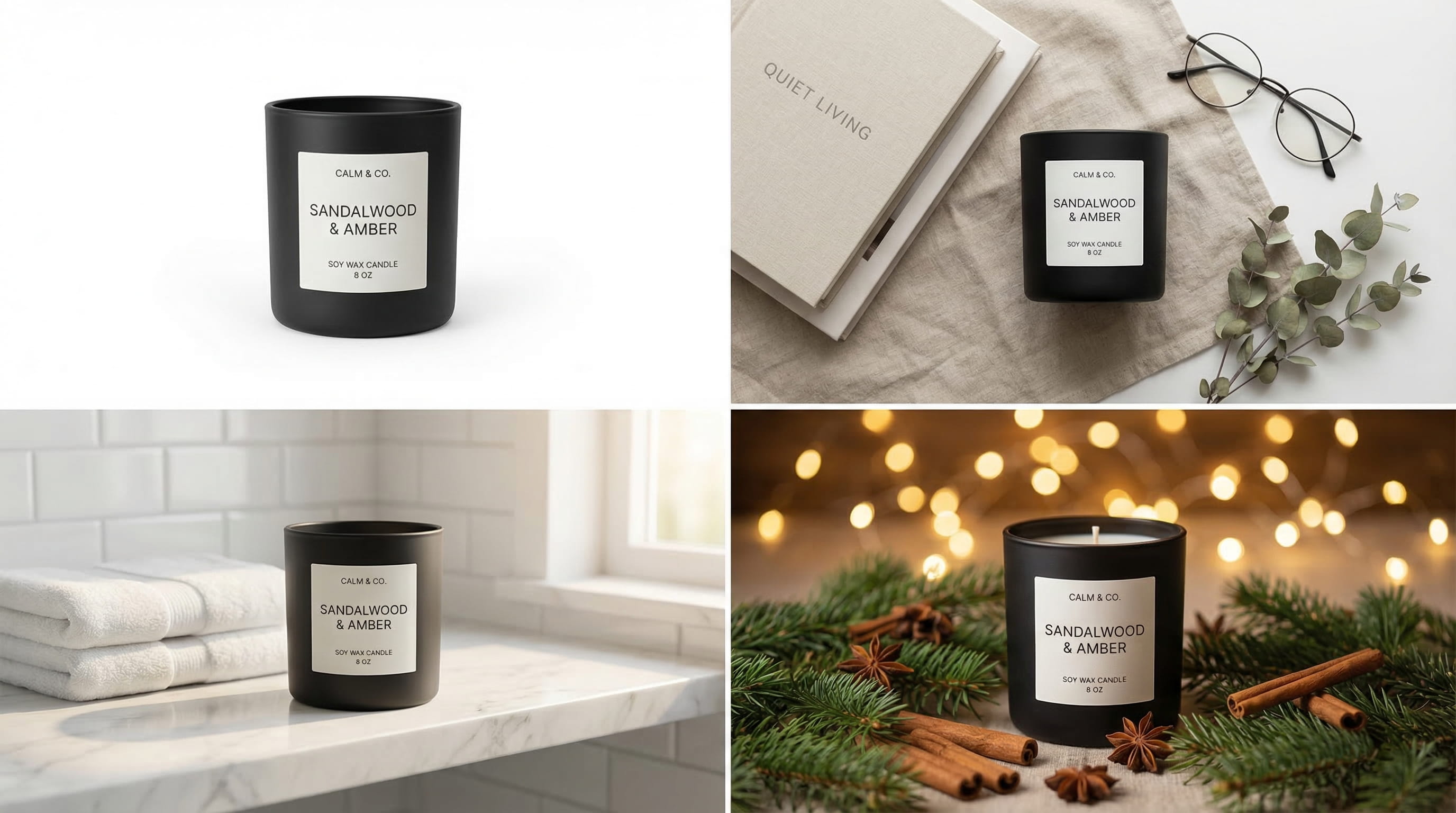
A professional product photoshoot costs $2,000-6,000. Studio rental runs $100-300/hour. And if you're launching 30 products this quarter, the math breaks before you even start.
Meanwhile, the stakes are high: 75% of online shoppers rely on product photos when deciding whether to buy (Weebly via Retail Technology Review). Products with high-resolution images see a 33% higher conversion rate than those with low-quality visuals. Your photos aren't decoration - they're your sales team.
This guide covers the fastest, most cost-effective ways to create product photos that convert in 2026 - including the AI approach that's replacing traditional photoshoots for thousands of e-commerce sellers.
This article is for Shopify, Amazon, Etsy, and TikTok Shop sellers who need professional product images without the traditional production budget.
In this guide:
- 5 product photo mistakes that kill sales
- 3 ways to create product photos (with real costs)
- AI product photos: the 2026 approach
- Platform-specific image requirements
- Getting started with Loomenia
- FAQ
Key Takeaways:
- E-commerce product photos are the #1 conversion factor - 75% of shoppers rely on images to make purchase decisions
- 3 paths: DIY phone setup ($50-150 one-time), professional photographer ($2,000-6,000+), or AI generation ($29-79/month for hundreds of images)
- The 2026 playbook: shoot one clean reference photo per product, then generate every scene variation with AI - white backgrounds, lifestyle, seasonal, flat lay
- Amazon requires white backgrounds for the main image; Etsy rewards lifestyle context; Shopify gives full creative freedom
- Tools like Loomenia generate publish-ready product images in under 60 seconds - no prompt writing, no photography skills
5 Product Photo Mistakes That Kill Sales
Before you invest in any method, make sure you're not making the mistakes that tank conversion rates regardless of how the photo was created.
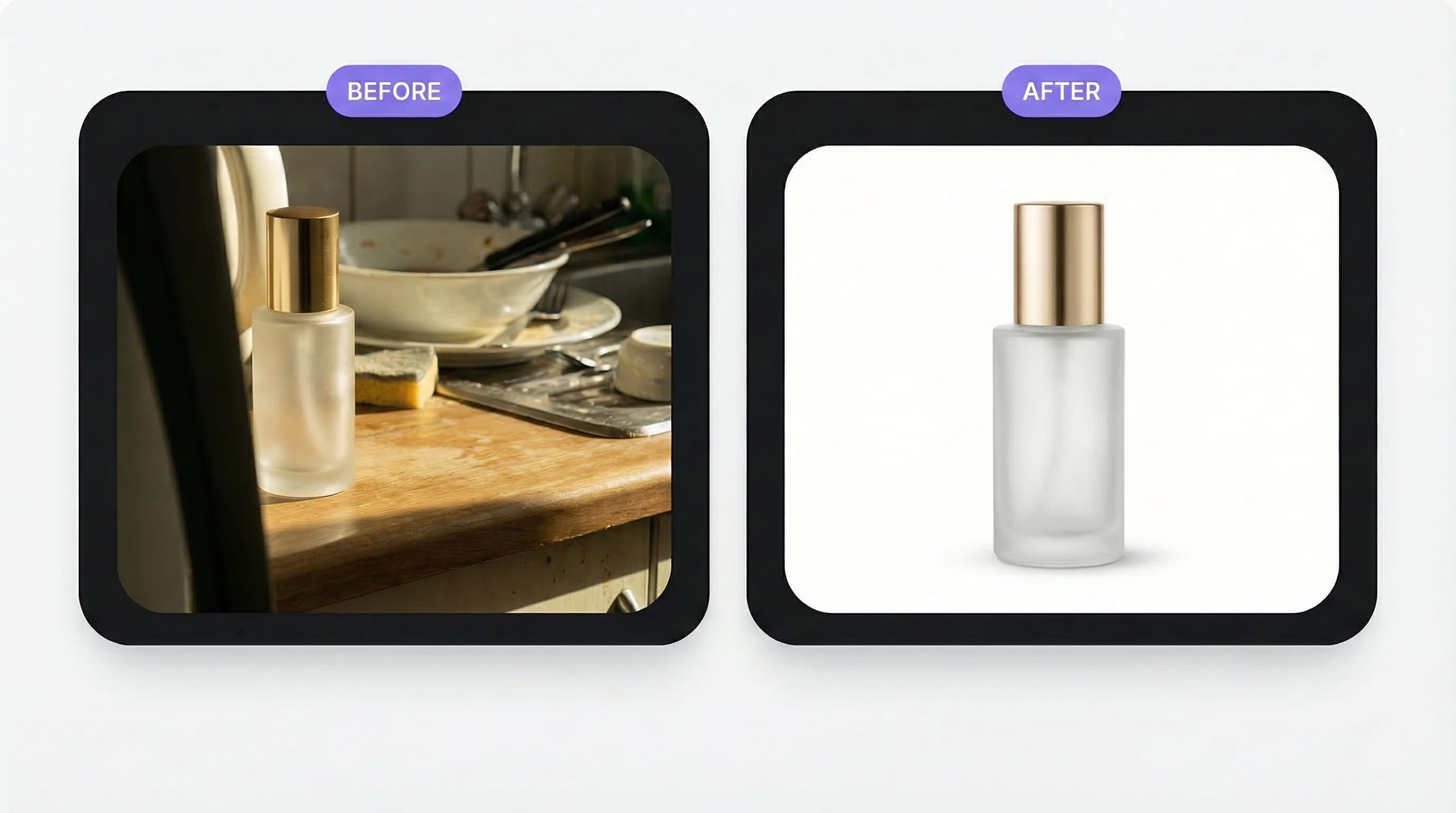
1. Cluttered backgrounds. Kitchen counters, bedroom floors, bathroom sinks. If there's a dirty dish or a TV remote visible behind your product, customers register "amateur" before they register "product." White or simple contextual backgrounds only.
2. Bad lighting - or no lighting strategy at all. The overhead kitchen light creates harsh downward shadows that make products look cheap. Soft, directional light (natural window light or two LED panels at 45-degree angles) is the difference between "AliExpress knockoff" and "premium brand."
3. Wrong white balance. Products that look warm and yellow on screen arrive looking different in person. According to Adobe, 22% of online product returns happen because the item looked different in real life than in the photo. Color accuracy isn't a nice-to-have - it's a return-rate reducer.
4. Only one image per product. Shoppers expect to see multiple angles and contexts. According to eMarketer, 60% of US digital shoppers want to see at least 3-4 images before buying. Best-performing listings typically show 5-8: front, back, detail close-up, scale reference, and lifestyle context. One photo leaves too many unanswered questions.
5. Inconsistent style across your catalog. When every product has a different background, different lighting, different aspect ratio - your store looks like a flea market, not a brand. Pick a visual system (white background hero + lifestyle secondary) and apply it consistently across every SKU.
Pro Tip: The hero image sells the click. The gallery sells the purchase. Your first photo should stop the scroll - your gallery images should answer every remaining question about size, texture, color, and use.
3 Ways to Create E-commerce Product Photos
| Method | Cost | Turnaround | Best For |
|---|---|---|---|
| DIY (phone + lightbox) | $50-150 one-time | Same day | Bootstrapped sellers, <20 SKUs |
| Professional photographer | $2,000-6,000+ per shoot | 1-3 weeks | Luxury brands, editorial campaigns |
| AI generation | $29-79/month | Minutes | Anyone who needs volume, speed, or variety |
DIY: The $100 Phone Setup
A modern smartphone (iPhone 15+, Pixel 8+, Samsung S24+) shoots at 48-200MP - plenty for e-commerce. Pair it with a foldable lightbox ($30-50), a phone tripod ($15-25), and two small LED panels ($20-40), and you can shoot clean white-background catalog images at home.
The catch: DIY handles white-background shots well. But the moment you need lifestyle scenes - your product on a marble surface, in a cozy kitchen, on a picnic blanket - you need props, surfaces, and styling skills that quickly cost more than the product itself. Most sellers hit this wall within their first 10 products.
Professional Photography: When It's Worth It
For luxury and premium brands where the photography itself is part of the brand story - think editorial campaigns, print catalogs, or hero images for a brand launch - traditional photography still wins. A skilled photographer controls every shadow, every reflection, every micro-detail.
The math: For a 30-product catalog needing 4 images each (120 images total), expect $3,000-6,000 for a photographer, plus $800+ for studio rental and $300+ for props and styling. That's $4,100-7,100 per shoot - and you'll repeat the cost every season.
AI Generation: The 2026 Default
For everything else - Shopify listings, Amazon secondary images, Etsy shops, social media, seasonal campaigns, A/B testing backgrounds - AI product photography delivers comparable quality at 98% lower cost. More on this below.
AI Product Photos: The 2026 Approach
Here's the shift: you no longer need to physically build every scene. You take one clean reference photo of your product, and AI generates it in any setting you want - marble countertop, outdoor picnic, holiday scene, flat lay composition. In seconds, not hours.
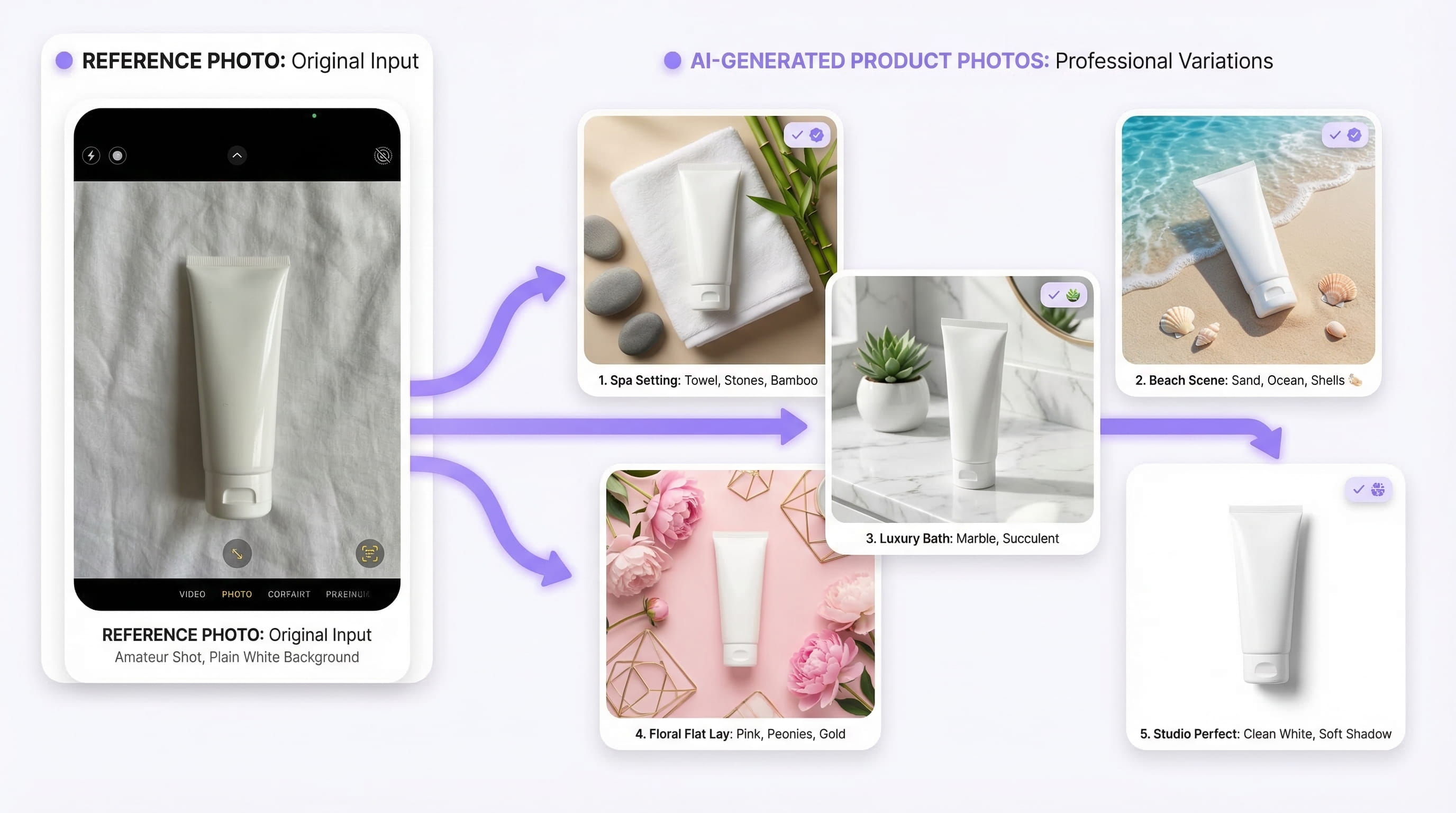
This isn't a future prediction. A BigCommerce analysis of 12,000 online stores found that merchants using AI-enhanced product photography saw conversion rate improvements of 35-60%, with a median increase of 49%. According to a Photoroom survey, 62% of consumers are comfortable with brands using AI-generated images in advertising - and 14% of e-commerce shops already use AI for product image creation.
For a deeper dive into the technology and how it compares to traditional studios, see our guide on virtual product photography.
Why AI Product Photos Win for E-commerce
- Fill your entire product gallery from one photo. Generate a white-background hero, 2-3 lifestyle shots, a flat lay, and a seasonal variant - all from the same reference image. That's 5-8 images per product without building a single physical set
- A/B test backgrounds at scale. Test which lifestyle context converts best - marble vs. wood, indoor vs. outdoor - at $0.10-2.00 per image instead of $200+ per reshoot
- Seasonal updates in minutes. Switch from summer to holiday backgrounds across your entire catalog without booking a new photoshoot
- Platform-specific versions instantly. Generate a white-background image for Amazon's main slot, a lifestyle shot for Etsy, and a UGC-style image for TikTok - all from the same reference
- Launch products the same day they arrive. Product shows up at your door? Snap a phone photo, generate your full image set, publish to all channels before lunch
What About Quality?
The most common concern: "Will they look fake?"
In 2024, yes - AI product images had a noticeable synthetic quality. In 2026, the technology has matured dramatically. The biggest quality factor isn't the AI - it's your reference photo. A clean, evenly-lit reference image on a plain background gives the AI everything it needs to produce photorealistic results.
Products with matte or semi-matte surfaces (skincare, cosmetics, candles, food packaging, apparel, electronics, home goods) work exceptionally well. Highly reflective surfaces (polished jewelry, glass bottles with liquid) may need 2-3 extra generations but are increasingly well-handled. For details on edge cases, see our virtual product photography guide.
Platform-Specific Image Requirements
Every marketplace has different rules. Here's what you need:
| Platform | Main Image | Gallery Images | Min Size |
|---|---|---|---|
| Amazon | White background required (RGB 255,255,255). Product fills 85%+ of frame. No text, logos, watermarks | Lifestyle, infographic, comparison images encouraged | 1000px min (2000px+ recommended for zoom) |
| Shopify | Your choice - white or lifestyle | 3-8 images, consistent aspect ratio | 2048x2048px |
| Etsy | Lifestyle context performs best (items in use or styled) | Mix of lifestyle and detail shots | 2000x2000px |
| TikTok Shop | White or light background, product-focused | Lifestyle and UGC-style images | 800x800px |
Notice the pattern: every platform wants both clean white-background shots and lifestyle context. With AI generation, you create both from a single reference photo in minutes. With traditional photography, that's two separate setups - two separate invoices.
Pro Tip: Amazon's minimum is 1000px on the longest side, but you need 2000px+ to enable the zoom feature that shoppers expect. When choosing an AI tool, make sure it supports at least 2K output. Loomenia generates up to 4K - more than enough for any marketplace.
Create E-commerce Product Photos with Loomenia

Loomenia AI Image Studio is built for exactly this use case - turning one product photo into a complete e-commerce image set. The key difference from other AI tools: you never write a prompt. Instead, you select from curated visual options, and the system builds the prompt for you.
How it works for e-commerce product photos:
- Upload your product as a reference image - phone quality is fine, white or plain background
- Pick a template from the gallery (Minimalist Marble, Flat Lay Lifestyle, Natural Window Light, etc.) - or configure your own scene using dropdowns for environment, lighting, camera angle, and style
- Auto color matching - upload your product and Loomenia extracts the dominant colors from the image, offering them as clickable swatches. Your scene's accent colors automatically match your product's brand palette
- Generate - images render in 15-45 seconds at up to 4K resolution
- Refine with chat - tell the AI "make the shadow softer" or "warm up the background" without regenerating from scratch
For full product galleries, use the AI Photoshoot feature: upload 1-3 reference angles of your product, and the system's AI agents analyze the subject, then direct 3, 5, or 10 varied shots - different angles, compositions, and framings - while keeping your product perfectly consistent across every image. It's like having a professional photographer on set, except it takes 2 minutes.
See a competitor's product photo you love? Use Extract Scene - upload the image and Loomenia reverse-engineers the lighting, camera settings, and environment into a reusable configuration. Apply it to your own products instantly.
| Plan | Price | Credits/month | ~Pro Images (2K) | ~Pro Images (4K) |
|---|---|---|---|---|
| Plus | $29/mo | 400 | ~100 | ~57 |
| Pro | $79/mo | 1,500 | ~375 | ~214 |
At $29/month, you get enough credits for 100 high-quality product images - that's a full 4-image gallery for 25 products. One traditional photoshoot costs 100x more.
Try Loomenia free - no credit card required →
Frequently Asked Questions
How many product photos do I need per listing?
Aim for 5-8 images per product: one white-background hero, 2-3 lifestyle/context shots, 1-2 detail close-ups, and one scale reference. 60% of US digital shoppers want to see at least 3-4 images, and listings with more angles consistently convert better. With AI generation, creating 8 images per product costs roughly the same as creating one.
Can I use AI-generated product photos on Amazon?
Amazon requires the main image to be a real photograph on a white background. AI-generated lifestyle and secondary images are widely used for gallery slots. Shopify, Etsy, and most other platforms accept AI-generated images without restrictions. Note: the EU AI Act's transparency provisions (Article 50) require disclosure when content is AI-generated. These provisions took effect August 2025, with fines up to €15 million or 3% of annual turnover for non-compliance. If you sell to EU customers, label AI-generated images accordingly.
What's the best background for e-commerce product photos?
White (RGB 255,255,255) for your main catalog image - it's required on Amazon and looks clean everywhere. For gallery and social images, contextual backgrounds (marble, wood, fabric, lifestyle settings) consistently outperform plain white in click-through rate. The ideal strategy: white hero + lifestyle gallery. AI tools let you generate both from the same reference photo.
Do product photos really affect conversion rates?
Dramatically. Products with high-resolution images see a 33% higher conversion rate than those with low-quality visuals. AI-enhanced product photography specifically has driven 35-60% conversion improvements across 12,000 stores tracked by BigCommerce. Poor images also drive returns: 22% of online returns happen because the product "looked different" than the photo.
How do I take a good reference photo for AI generation?
Shoot your product on a white or light gray surface. Use natural window light or two LED panels - avoid overhead room lighting. Use your phone's 1x lens (no zoom), turn off flash, and mount on a tripod or stable surface. The AI doesn't need a perfect photo - it needs a clean, well-lit one where the product is clearly visible and fills most of the frame.
What products work best with AI photography?
Products with matte or semi-matte surfaces produce the best results: skincare, cosmetics, food packaging, candles, apparel (flat lay), electronics, accessories, and home goods. Highly reflective items (polished jewelry, glass with liquid) may need a few extra generations. See our virtual product photography guide for a full breakdown of edge cases.
The Bottom Line
Your e-commerce product photos are either selling for you or losing sales for you. There's no middle ground.
The old playbook - hire a photographer, rent a studio, wait 2 weeks, pay $5,000 - still works for luxury editorial campaigns. But for the 95% of e-commerce sellers who need great images at scale, it's been replaced by a faster, cheaper approach: one clean reference photo + AI generation.
Shoot one product. Upload it. Generate your entire gallery - white background, lifestyle, seasonal, flat lay - in under 5 minutes. Publish to Amazon, Shopify, Etsy, and TikTok the same day. Repeat for every SKU in your catalog.
Start creating product photos with Loomenia →
Sources:
- Retail Technology Review: 75% of Online Shoppers Rely on Product Photography - Weebly survey on product image influence
- Shopify: Product Photography Guide - 33% higher conversion rate with high-resolution images
- Adobe: Guide to Effective Product Photography - 22% of returns due to product-image mismatch
- eMarketer: Photos Can Influence a Purchase - 60% of shoppers want 3-4+ images per product
- BigCommerce / Breaking AC: AI Product Photos Revolutionizing E-Commerce - 35-60% conversion rate improvement across 12,000 stores
- Photoroom: AI Product Photography Statistics - 62% of consumers comfortable with AI-generated brand images; 14% of shops already using AI
- EU AI Act Article 50: Transparency Obligations - AI-generated content disclosure requirements, fines up to €15M